Upload a photo of yourself and explore new identities with AI! Try Photobooth to swap your face in new images.
Gencraft2 minutes read
Features
Photobooth allows you to generate variations of yourself! You can use Gencraft to become whatever you want – the only limit is your imagination. In this tutorial, we’ll walk you through how to use this tool and show some examples of what you can create with it.
Generate yourself in a different setting
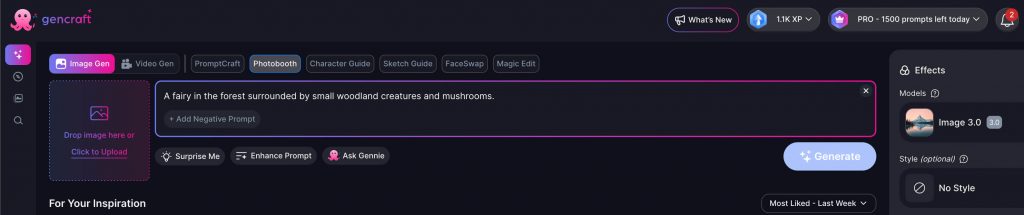
To begin, type in your prompt. This prompt should envision the final image you wish to be a part of. In this example, we’ll be using “A fairy in the forest surrounded by small woodland creatures and mushrooms.”
Note: Make sure to mention a person in the prompt — if you just say “the forest,” the model won’t put you in the image.
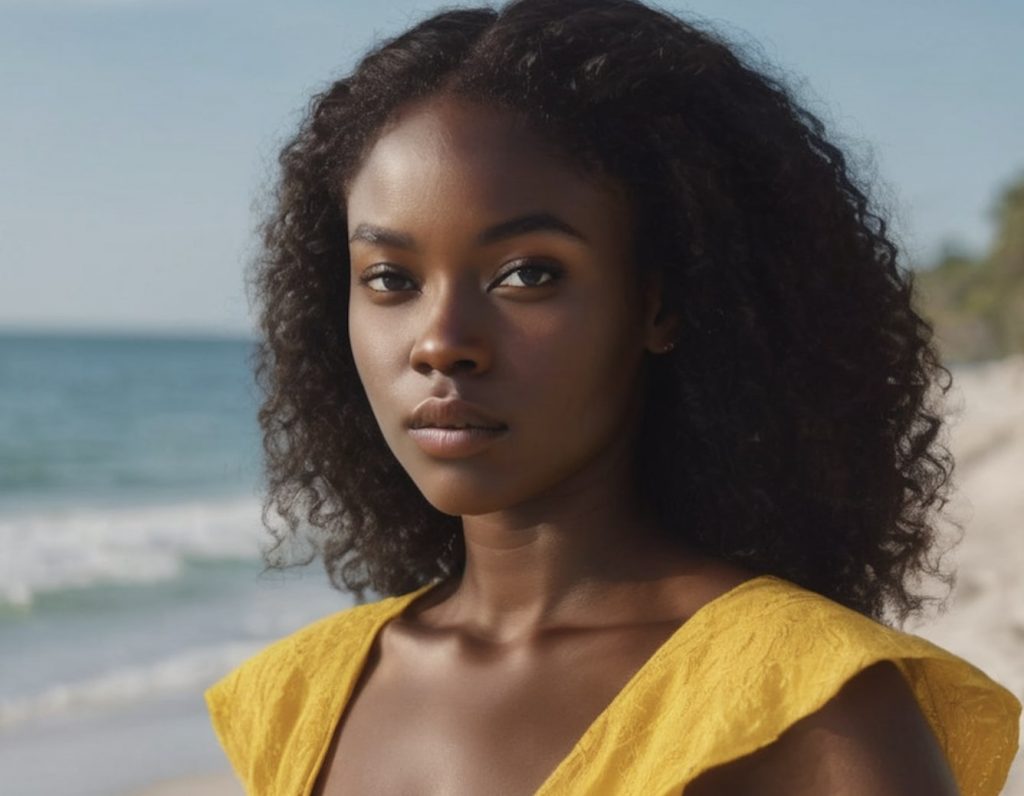
Click on Image Selection Section on the left of the Prompt Input to either upload your photo or select an image from your past uploads. We’ll be using the image below as our reference:
The portrait we are uploading as our Photobooth reference image
Once you have chosen your image just go ahead and click on the Generate button.
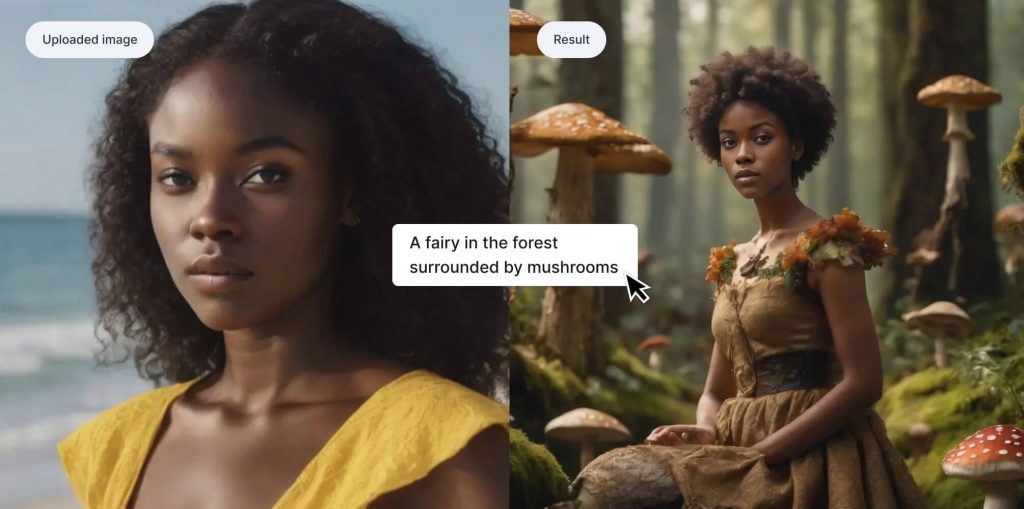
It’s that easy! Our final image is shown below, with the image we uploaded incorporated into the prompt.
The uploaded image and the final image side by side.
Generate yourself in a different style
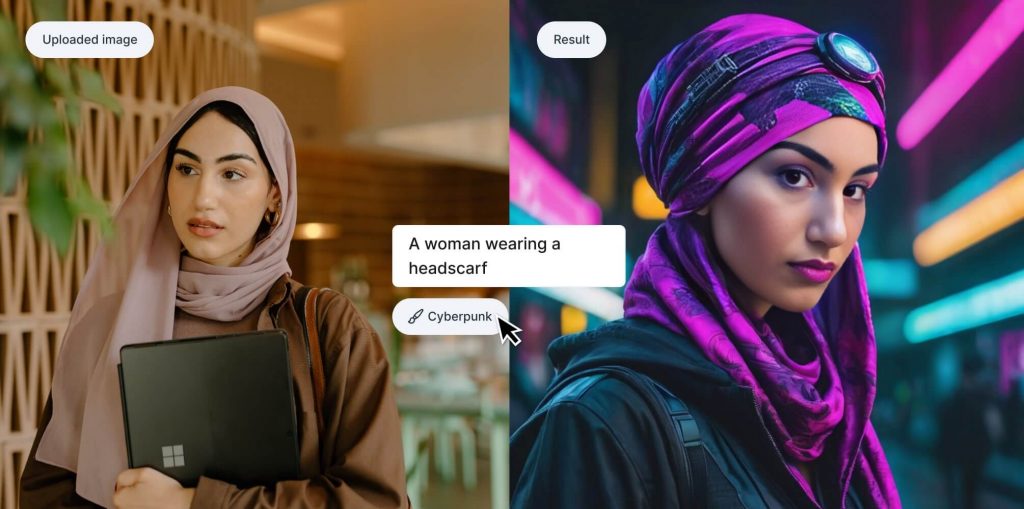
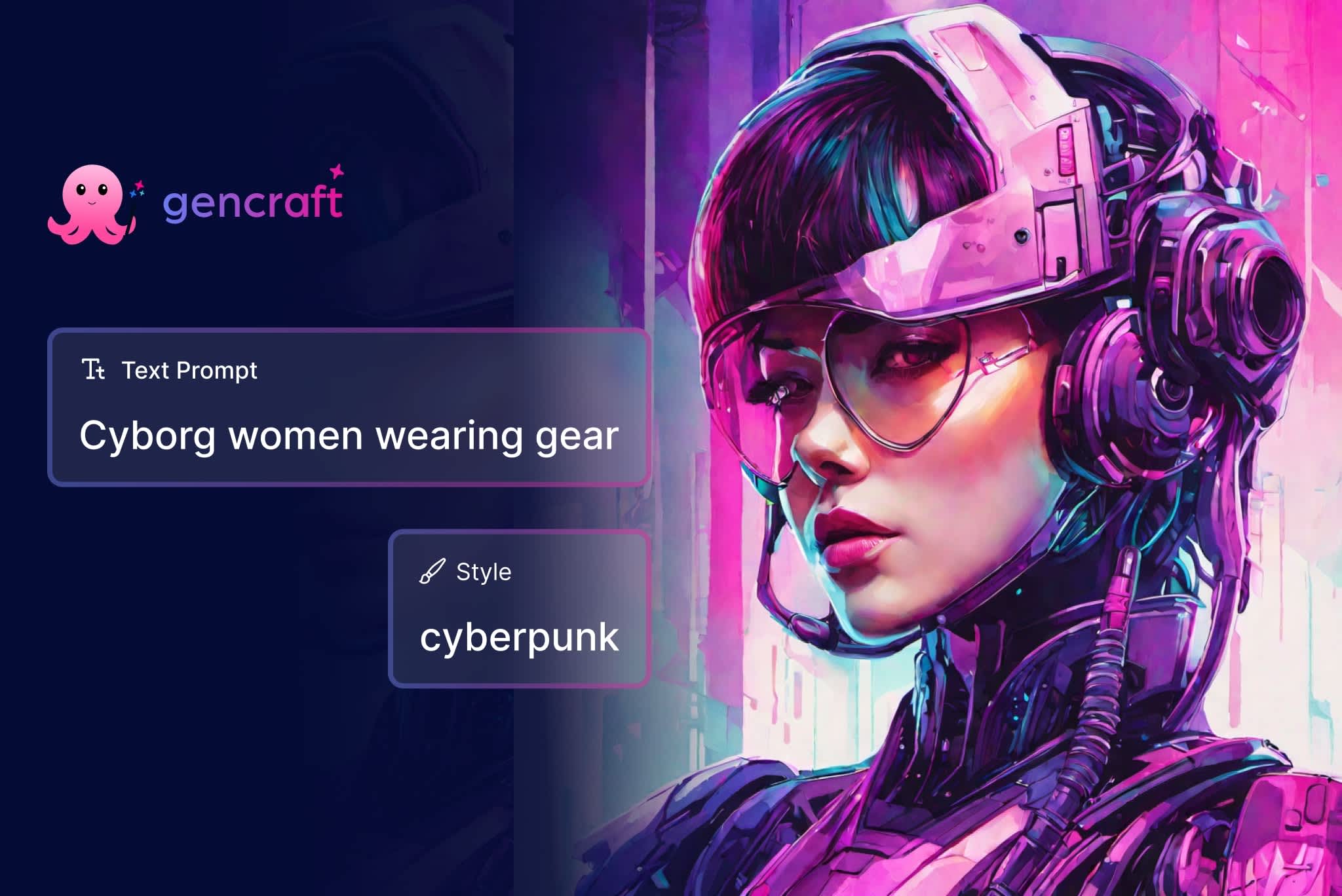
You can also transform images of yourself in exciting ways using Gencraft’s built-in Styles. You don’t need any sort of complicated prompt — simply enter a short sentence that includes a person, pick a style, and hit Generate! In the below example, we used the prompt “A woman wearing a headscarf” and selected “Cyberpunk” as our Style.
The uploaded image and the final image side by side.
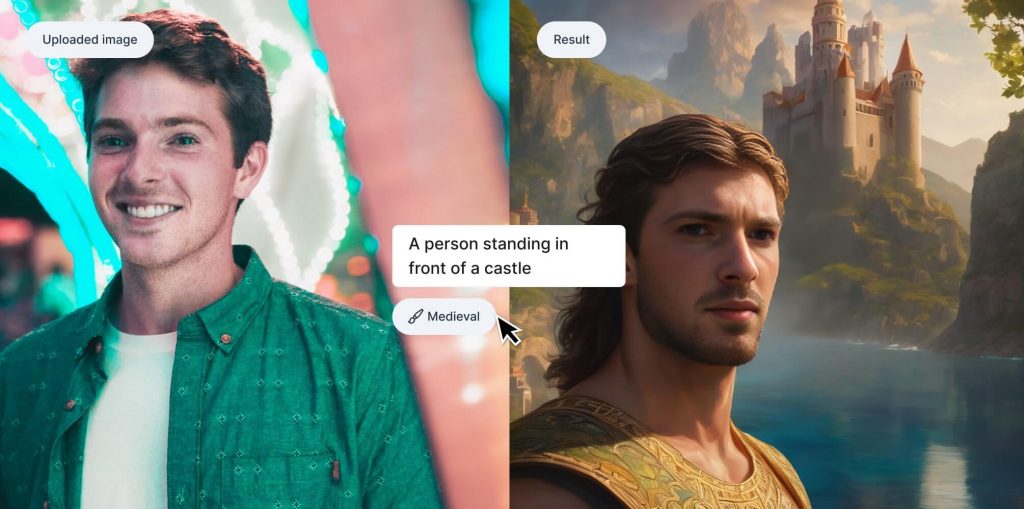
Here is an another example using the Medieval Style. Notice again how general the prompt is here – our preset styles will do the rest.
The uploaded image and the final image side by side.
Of course, feel free to play around with Gencraft’s Advanced Settings such as model selection and negative prompts before you hit “Generate”.
We hope this tutorial was helpful. Check out our other step-by-step guides, and feel free to contact us at support@gencraft.com if you have any additional questions.
We’re excited to announce the launch of our redesigned generate experience on our mobile apps! This redesign also has the goal of making generating content smoother and more intuitive, while also making it easier to view and remix results. Check out the full blog post for all the details. Explore the redesigned app and let us know what you think via Discord or the in-app feedback form!
Gencraft2 minutes read
Design Update
Hi Everyone,
We’ve just launched our mobile redesign! A couple of months ago, we went live with our web redesign – you can read about it in our last blog post. This time around we’ll be diving into what’s changed with our mobile app, as well as our motivations.
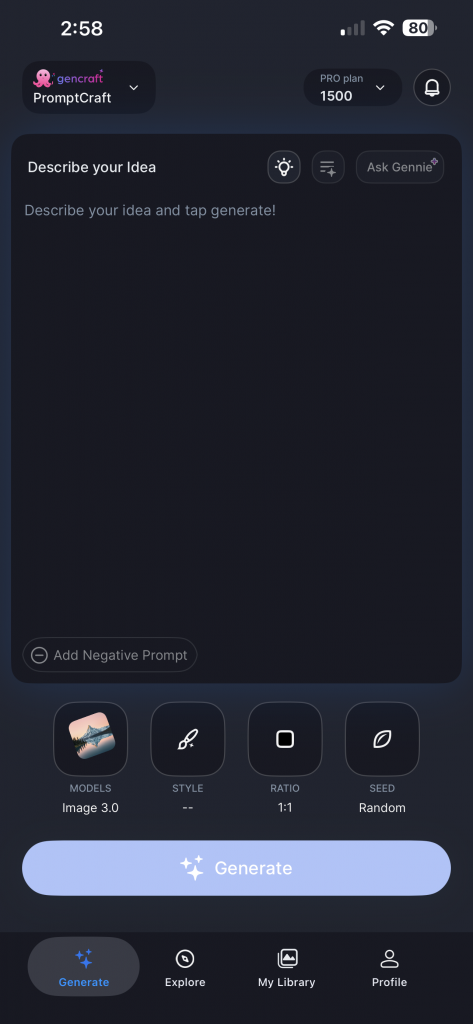
Similar to the web redesign, this redesign primarily targets the end-to-end generate experience, from writing prompts and selecting generation settings to viewing your creations. We wanted to ensure you all were receiving a better, more intuitive generation experience for our users while maintaining all existing features and functionality.
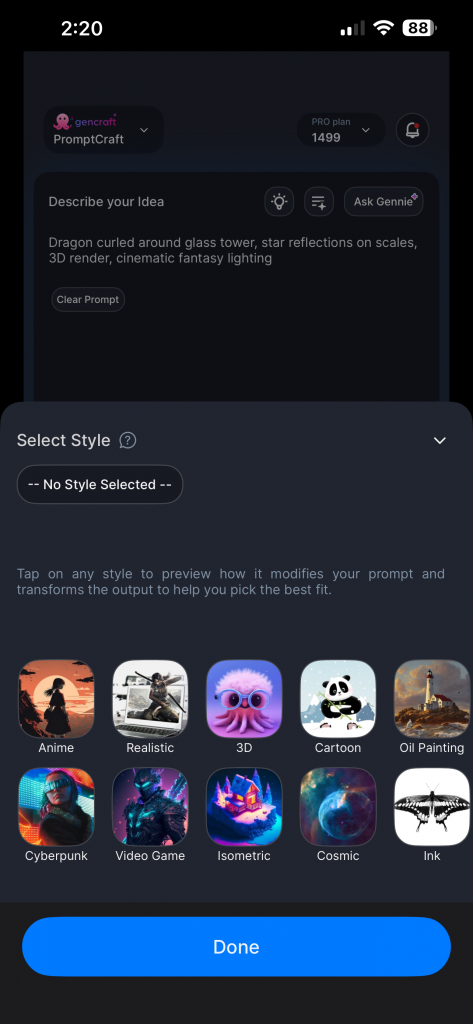
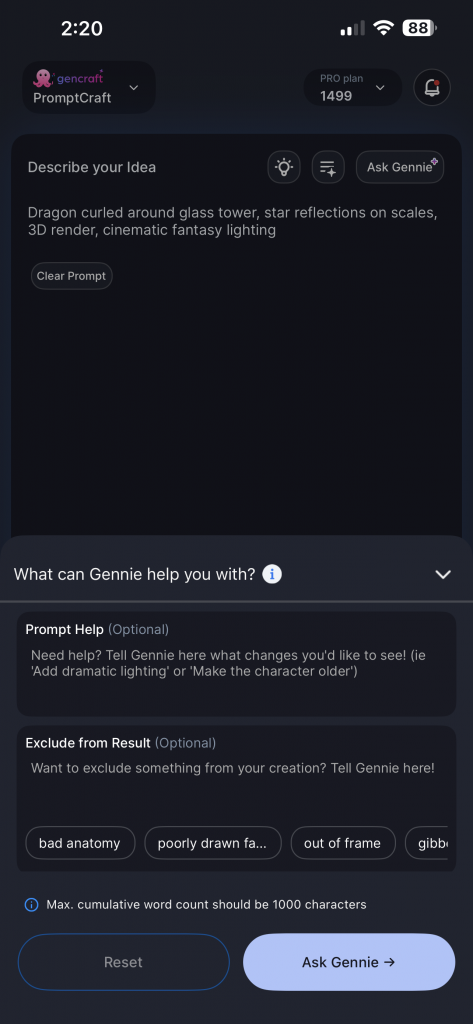
The new generate screen!Easily customize your generation settingsAsk Gennie for help in crafting your promptsThe redesigned generate experience
The new generate screen presents a simplified UI that emphasizes the prompt input, which is the most important element for creation. Optional inputs, like reference images, are hidden unless required for the selected feature. We want users to be able to generate quickly without extraneous UI elements.
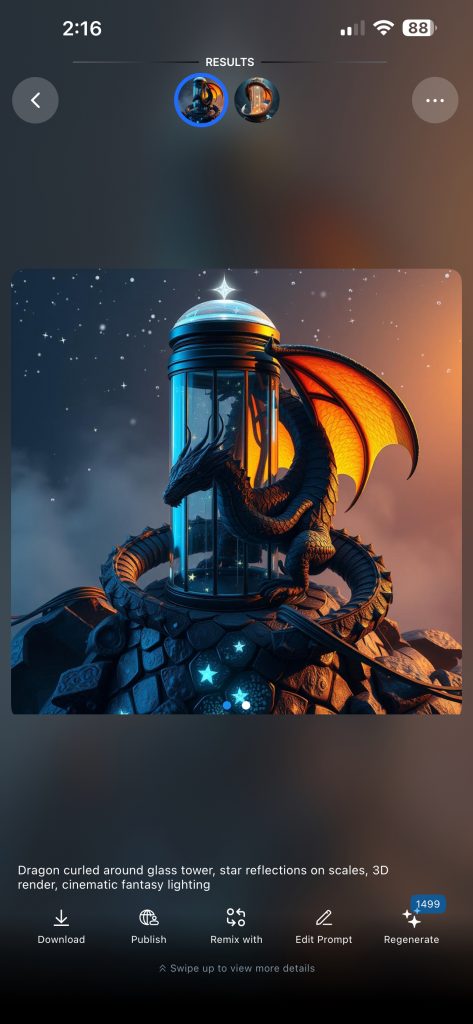
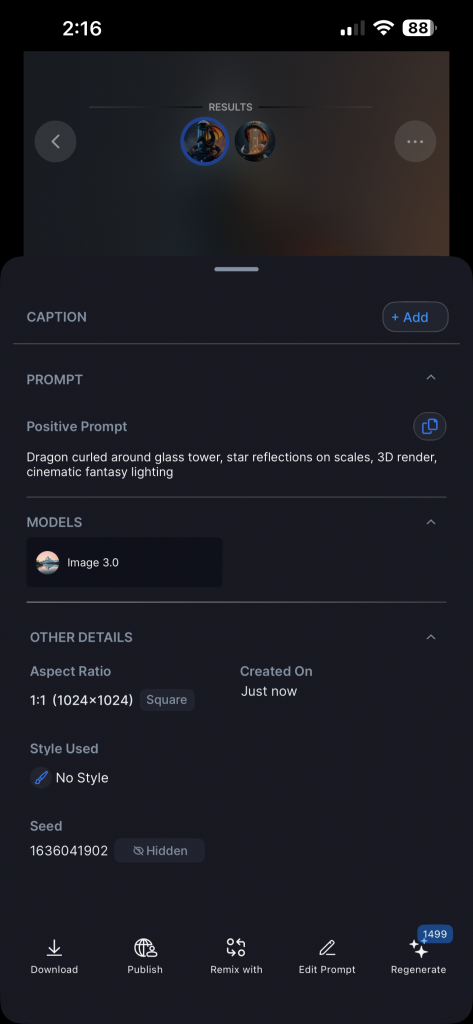
The new result screenSwipe up to view result detailsThe revamped result screen experience
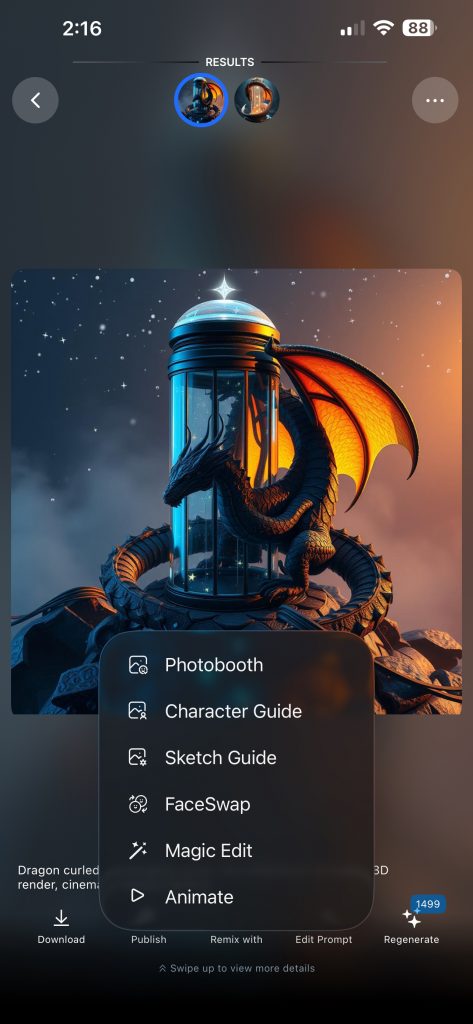
The new creation results screen brings more focus to the actual creation, which is now larger and more prominent. Swipe left and right to navigate between both creations, and swipe up to view the full details for the creations. Key actions like remixing, publishing and downloading are still one tap away, but are now consistently organized in the UI.
Overall, the new redesign will help Gencraft feel more modern and intuitive to new and old users alike. Please give the redesign a try and let us know any feedback!
Use the “Add Negative Prompt” section to specify exactly what you don’t want in your generations. These negative prompts exclude unwanted elements.
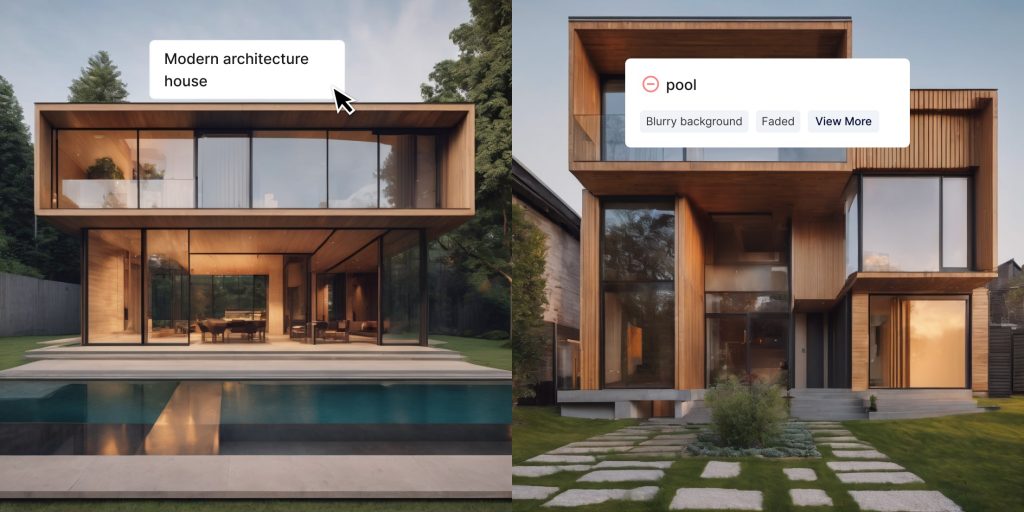
For example, say that you’re using the prompt “Modern architecture house.” The houses you’re generating look pretty good, but a lot of them have pools and you don’t want that to be a part of your image.
The prompt “Modern architecture house” without any negative prompts (left) and with “pool” added as a negative prompt (right).
If you click on “+ Add Negative Prompt” button, you can enter “pool” to encourage the model away from including a pool in your creations. With this configured, this prompt no longer results in houses with pools.
People often use this section to try and counter a lot of the common weaknesses of an AI art generator, such as abnormal hands or duplicated faces. Under the negative prompt text box, there are several suggested negative prompts to help you come up with ones that you may want to use.
Certain negative prompts are more effective than others, simply due to the fact that AI models do not always interpret language the way that people do. For example, you may try to make sure that a generated cat does not look like a dog by including “dog” as a negative prompt. Dog and cat, however, are two very closely related concepts. They are both animals, and they are both popular pets. To a person, the difference between the two is pretty distinct, sometimes to the point of framing them as opposites. But to an AI model? They are almost the same. This can result in a negative prompt being less effective. Just like many aspects of AI art generation, it may take some experimentation to get it right.
We hope this helped you to get started exploring Gencraft and its endless creative possibilities. Check out our other step-by-step guides, and feel free to contact us at support@gencraft.com if you have any questions we didn’t answer.
Take your image creation to the next level by learning how to effectively use Custom Seeds! Using seeds gives you more control over the structure and composition of your generated images, making it easy to experiment with slight variations while keeping key elements intact. This guide will teach you what seeds are, how to use them, and how they can unlock new creative possibilities for your prompts.
What Is a Seed? 🌱
Think of a seed as the starting point or blueprint that guides the AI during image generation. Each time you generate an image, the AI randomly selects a seed behind the scenes. By choosing and reusing custom seeds, you can reproduce the same base composition and structure, allowing for precise edits without starting from scratch.
For example, if you loved the composition of one generated landscape but wanted to change the color of the sky, using the same seed with a slightly different prompt will recreate a similar image with just those specific changes.
Why Use Custom Seeds? 🎨
Using custom seeds offers a range of creative benefits:
Maintain Structure: Control the layout of the elements in your image across multiple generations.
Fine-Tune Variations: Generate slight variations of the same image by changing only part of your original prompt while keeping the composition consistent.
Experiment with Precision: Iterate on a design by generating multiple similar images, each with subtle changes, so you can pick the best version.
Save Time: If you’ve already found an image layout you love, using its seed will save time by avoiding the need to search for the right composition again.
How to Use Custom Seeds in Gencraft 🛠️
Note: Custom Seeds are a PRO 👑 only benefit in Gencraft, so upgrade today to start trying this powerful feature!
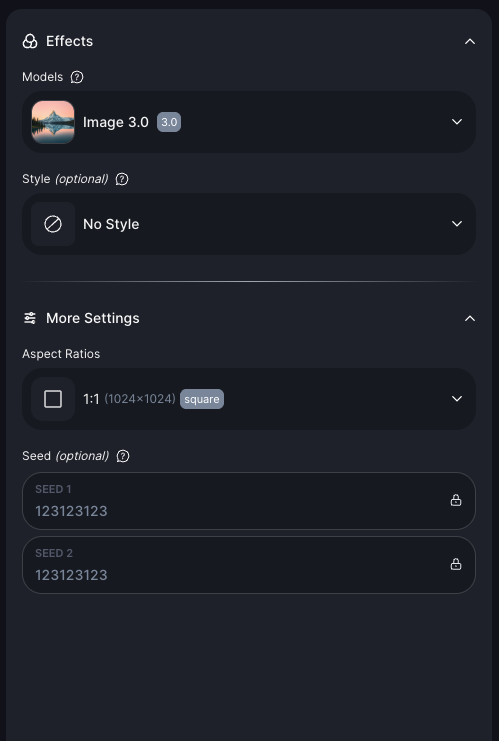
Seeds Option available in Advanced Settings.
Find the Seed of a Previous Generation
After generating an image, look for the seed number displayed under your image/on the Generate Form ( in Advanced Settings tab. )
Lock the Custom Seed option to fix your next generations to those seed values.
Start Generating New Prompts With Your Custom Seed
While Re-Generating a new prompt, write a slightly modified version of your original prompt to introduce the changes you want.
Example :-
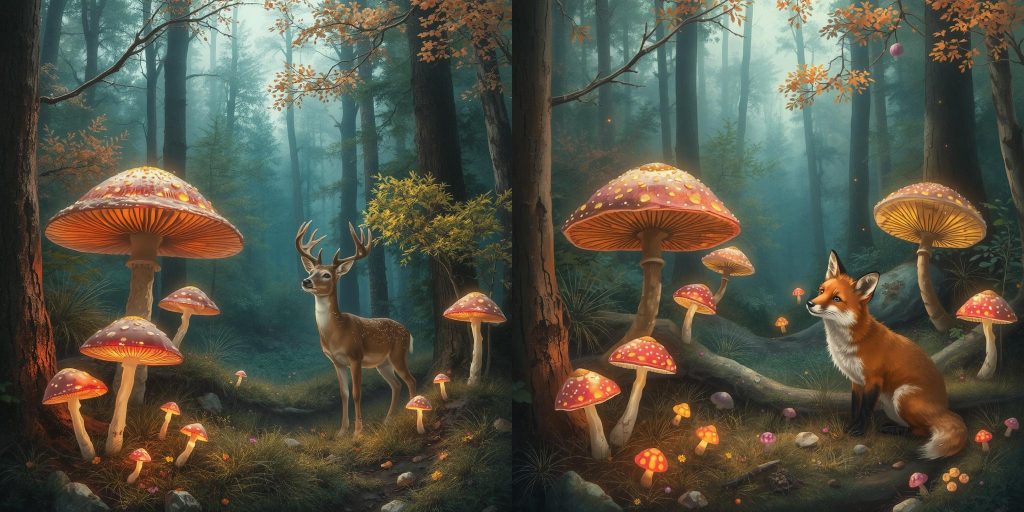
First Prompt: “A vibrant forest scene with glowing mushrooms and a deer.”
Second Prompt (with the Custom Seed fixed): “A vibrant forest scene with glowing mushrooms and a fox.”
By using the same seed, both images will have a similar layout and structure—but the second version will feature a fox instead of a deer.
Handling Two Seeds for Paired Generations ✌️
When generating multiple images in a single batch, Gencraft allows you to input two seeds to control each image independently. Occasionally, you might notice that the images are returned with the order of the seeds swapped.
Don’t worry! Even if the images appear in a different order, the seeds still correspond correctly to the generated results. The key is that the structure and composition dictated by the seeds remain intact, no matter what order they appear in. Just pay attention to which seed corresponds to which final image.
Tips and Tricks for Using Seeds Effectively 🚀
Make Incremental Changes: Modify only small parts of your prompt to explore creative variations while preserving your original composition.
Document Your Favorite Seeds: Save the images with seeds that generated your best results. This way, you can revisit or tweak those images in your Collections later.
Use Seeds for Consistent Branding: If you’re working on a series of visuals with a similar look and feel (e.g., product photos or social media content), reusing the same seed will ensure a cohesive aesthetic.
Avoid Overfitting to One Seed: Don’t be afraid to try different seeds as well! While using custom seeds offers control, toggling the setting off and using random seeds can unlock exciting surprises.
Start Creating with Custom Seeds Today! 🎉
Now that you understand how custom seeds can unlock new creative potential, it’s time to try it yourself! Whether you’re refining a single prompt or building a series of cohesive images, using seeds gives you the precision and flexibility to perfect your results.
Head over to gencraft.com/generate and start experimenting with your own custom seeds today. We can’t wait to see what you create!
Creating amazing AI images starts with a good prompt. If you’re new to this, don’t worry! This guide will teach you all the essentials — no prior experience required. Think of it like giving clear instructions to a robot: the better you describe your vision, the closer the result will be to what you imagined
Gencraft3 minutes read
Other
Creating amazing AI images starts with a good prompt. If you’re new to this, don’t worry! This guide will teach you all the essentials — no prior experience required.
Think of it like giving clear instructions to a robot: the better you describe your vision, the closer the result will be to what you imagined.
Why Do Prompts Matter?
The prompt you write tells the AI exactly what to generate. But since the AI doesn’t “think” like a person, the more precise, descriptive, and focused your prompt is, the better your result will be. Experimentation is part of the fun, and even mistakes can lead to happy surprises!
Let’s break it down into simple tips to help you get started.
Tip 1: Start with a Clear and Specific Prompt 🧠
Vague prompts can confuse the model, leading to results that may not match what you’re imagining. Instead of:
“A beautiful landscape”
Try:
“A serene sunset beach scene with palm trees and gentle waves.”
The second prompt paints a clear picture for the AI, leading to more precise results. Think about the elements you want to include, such as objects, colors, and settings.
Tip 2: Use Descriptive Language for Mood and Style 📝
Add adjectives and adverbs to shape the mood, tone, or visual style you want to achieve. For example:
“A whimsical, colorful forest with glowing mushrooms and fairy lights.”
“A minimalistic black-and-white portrait of a cat with a mysterious expression.”
Descriptive language helps the AI understand the feeling and vibe you’re going for. The more vivid your descriptions, the closer the AI will get to your creative vision.
The second prompt paints a clear picture for the AI, leading to more precise results. Think about the elements you want to include, such as objects, colors, and settings.
Tip 3: Reference a Character or Artist for Inspiration 👩🎨
You can give the AI a reference to a well-known art style, movement, or artist. For example:
“A futuristic cityscape inspired by the neon aesthetic of Cyberpunk 2077.”
“A swirling, dreamy night sky in the style of Van Gogh’s Starry Night.”
This helps the AI match your vision with an existing aesthetic, guiding it toward the style you want.
Tip 4: Avoid Negations in Prompts ⛔️
The AI can struggle with words like “not” or “without.” Instead of saying:
“A huge mansion, no pool”
Try focusing on what you want to see instead. Use our negative prompt feature to explicitly exclude things:
“Generate a modern mansion surrounded by a garden”
Negative Prompt: “pool“
Note: Negative prompts have varying degrees of effectiveness, depending on the Model you have selected. Some Models react very strongly to negative prompts, while others do not, so play around with it and adjust your prompt accordingly.
Tip 5: Experiment With Your Prompt Format 🔬
You can write your prompt as either a sentence or a list—whichever feels more natural to you:
Sentence: “A cat sitting on the beach enjoying the sunshine.”
List: “Cat, beach, bright sunshine, joyful expression.”
Both formats work, so feel free to experiment and see which one gets you the best results!
Tip 6: Use ((Word Weighting)) for Greater Emphasis 💪
If some parts of your prompt are more important than others, you can assign weights to them by using parentheses. The more parentheses you use, the more emphasis the AI places on those words.
Example Prompt with Weights:
“A (((tattoo of a fox))) on an ((ankle)) with a (weird, mystical aura).”
In this prompt:
“Tattoo of a fox” is the most important part (3 parentheses).
“Ankle” is second in importance (2 parentheses).
“Weird, mystical aura” has the least added emphasis (1 parenthesis).
Weights give you more control over what details the AI prioritizes in your final image.
Tip 7: Use the Prompt Enhancer for Extra Detail 🔎
Stuck on what to say? Try our Enhance Prompt tool! This feature adds more descriptive language and applies word weights to your prompt automatically.
Click the “Enhance Prompt” button at the bottom right of the prompt box to get started.
Example:
Starting Prompt: “A man standing in front of a castle.”
Enhanced Prompt: “A (((man))) standing confidently in a (((plaza outside a medieval castle))), his posture suggesting authority and gravitas, with the (opulent castle walls and turrets looming in the background).”
We’re excited to officially announce the launch of our redesigned generate experience for WEB! This redesign was built from the ground up to make generating content smoother and more intuitive, while also making it easier to view and remix results. Check out the full blog post for all the details. Explore the redesigned app and let us know what you think via Discord or the in-app feedback form. And be on the lookout for some exciting announcements coming up!
Gencraft2 minutes read
Design Update
We’re bringing the blog back! In this post, we’ll dive deeper into what’s new with the latest updates on Web, share some insight into the motivation behind the changes, and cover any other relevant updates.
First, the largest and most visually noticeable change with this update – the redesigned generation flow. This was a large undertaking by the development team that began with redesigning the generation flow from the ground up. We wanted to address a few key areas with the redesign: consistent UX, making it easier to iterate on an idea via re-generating, and showing community creations directly on the generate screen.
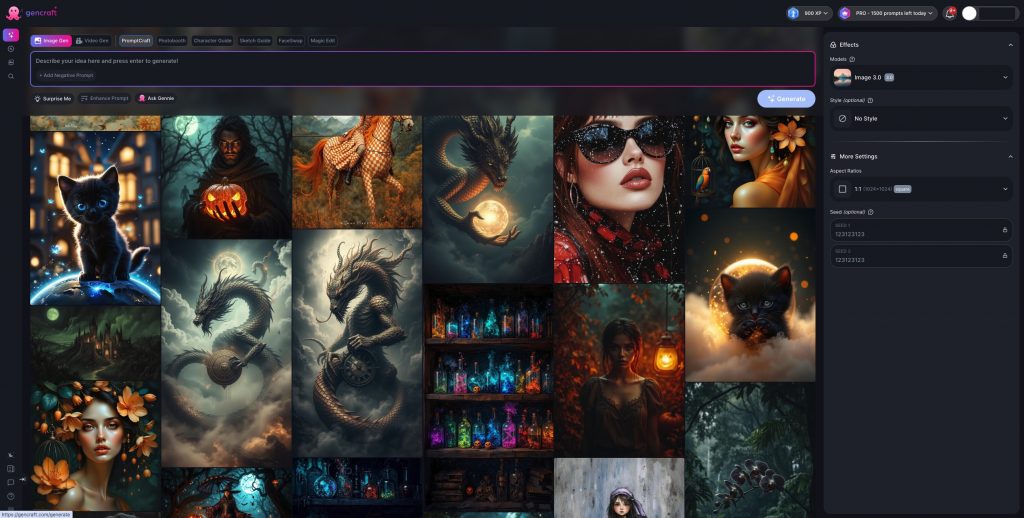
The redesigned generate screen
The new generation screen has all the various generation settings and configurations (model, style, aspect ratio, etc.) in one place: the right panel. Model and style selection have consistent UX as well. Features like Photobooth, Magic Edit, and Animate are now much easier to access and switch between.
Right-side panel containing all the generation settings
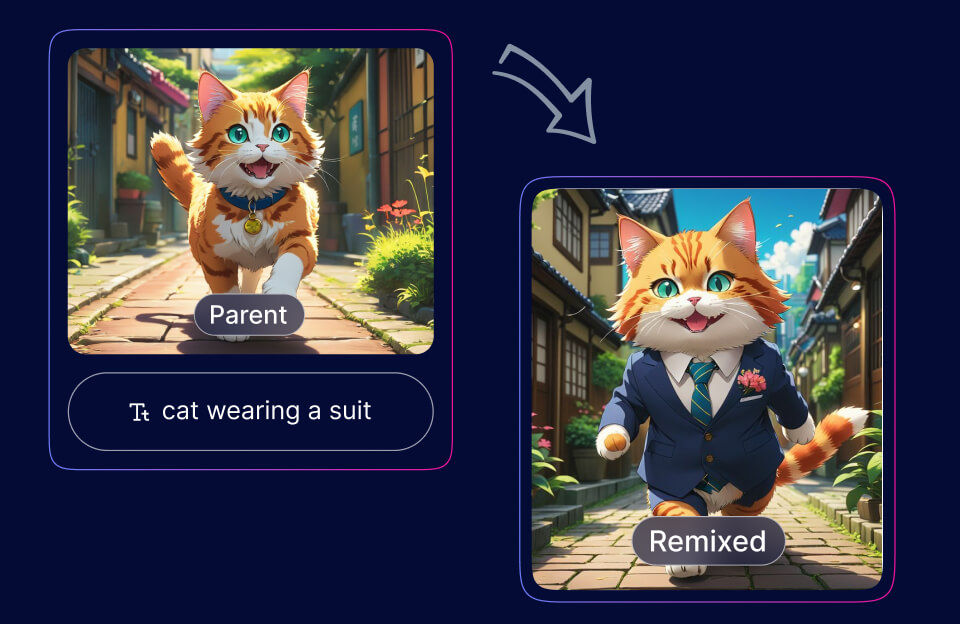
Another notable change is the introduction of the explore feed on the Generate page. Users can browse others’ creations directly on the Generate page and switch between filters like Most Liked, Trending, Newest, etc. With this, users can more easily draw inspiration from others’ work without needing to switch to the explore page, as well as find interesting creations to remix. The Explore page is unchanged, so feel free to browse there as well!
Browse community creations while generating!
The generation results screen has also been overhauled – now, both creations are directly shown side-by-side. Users can view and compare the two creations without hopping back and forth between results. Additionally, users can continue to generate straight from the results screen – feature selection, prompt input, and generation settings are available even while viewing results. This makes it easier than ever to iteratively improve a prompt or output, or just to regenerate with a new seed.
See image results side-by-side on the new results screen.
In addition to the redesign, we’ve also added an in-app announcement system to allow for broader communication with users, as well as an in-app feedback form to ensure users are able to share their thoughts. We appreciate all user feedback, so please let us know how you’re feeling about the redesign or your experience with Gencraft in general!
The new in-app feedback form!
This update also includes a few smaller UI changes and bug fixes that should help the app run more smoothly.
Overall, we’re excited to see what everyone thinks about the design changes. Right now, only the web design has been refreshed, but updates to the mobile apps are coming as well! We’re also working behind the scenes on a couple larger updates, so be on the lookout for any upcoming announcements. Thanks for reading, and keep on creating!
We’re excited to announce a major upgrade to our XP system, adding milestone-based rewards for all Gencraft users! As you accumulate XP by creating images and earn rewards you can redeem to celebrate milestones and further your creative journey.
At Gencraft, our mission is to empower everyone to find a home for their imagination, helping them find their unique voice and connect with a like-minded community. We hope the XP system grows into a tool that inspires users in remarkable ways, unlocking new opportunities for creativity and collaboration.
Let’s take a closer look at how our updated XP system works and the creative features we’re excited about.
Maximize Your Creativity: How the XP System Works 👇
At Gencraft, we place tremendous value on our users and their journeys. That’s why we aim to create a transparent and fair reward system by explaining in detail how it works.
For Pro users, the XP system includes additional opportunities to earn rewards, which means even more ways to celebrate your progress. Meanwhile, new users and those with less XP don’t need to worry—they can catch up by using tips and completing quests specifically designed to help maximize XP gains.
Check Out the XP Portal
To make tracking your progress easy, we’ve created the XP Portal. If you haven’t already, check out the XP Portal on Gencraft!
Keep track of your reward progress within your Gencraft account’s XP Portal, located in the top header. In the portal, you can learn about XP, view your XP gains so far, and the XP required to unlock your next reward. This makes it easier than ever to stay on top of your milestones and plan your next creative steps.
From this Portal, you can also navigate to the Rewards Store and view the rewards you’ve earned.
See Your Rewards at the Store
Our Rewards Store is the one-stop place to manage all your earned rewards. Here, you’ll find stauses for each reward, categorized as:
Available: Ready to claim!
Claimed: Claimed but not yet used.
Expired: Claimed but not used in time.
Used: Claimed and fully redeemed.
Additionally, rewards currently in use are labeled “In Use” on their Reward Card.
When you’re eligible to claim a new reward, you’ll be notified through the XP Portal. Once you claim it, you’ll automatically enter the Store to reveal your mystery prize!
Show Off Your Style: Unlock Badges!
As you continue publishing content and interacting with the community, you’ll have the opportunity to celebrate your achievements with stylish Badges! Once you reach a certain XP threshold, you’ll become eligible to redeem badges that display on your profile
To claim your badge, simply visit the Rewards Store. Once claimed, badges can be used immediately to showcase your creative mastery.
Your badge and its associated labels will be displayed prominently on your profile, feed, comments, and more until it expires. Moreover, clicking a user’s badge opens a pop-up explaining its significance!
We’re very excited to bring more badges to the Rewards Store as creators continue to express themselves in unique ways.
Celebrating Our Creators: Inspiration in Action
Our community is already lighting up with users proudly showcasing their badges—and we couldn’t be more excited! For example, creators like SorayaK and VisionaryArt have used their badges to elevate creative presence in our Gencraft community, standing out with their stunning work and achievements.
If you’re curious, take a look at the Social Feed to see badges in action! Whether you’re a veteran user at the top of the leaderboards or a new user starting your creative journey, badges make your profile even more impactful.
As we onboard more creators and release more rewards, we’ll see each badge telling a story, celebrating the dedication and creativity behind earning it.
So why wait? Join the movement! Claim your badges, display them proudly, and share your unique journey with the Gencraft community. Your achievements could inspire others to reach their own creative milestones.
Exciting Future Rewards: Boosted Posts 🎉
Get ready to take your creations to the next level with Boosted Posts, an upcoming Reward on Gencraft! With this feature, you’ll be able to redeem XP to boost the visibility of one of your creations on the Social Feed. Your work will be in front of more eyes and unlock new opportunities for connection.
Boosting your creation will make it easier than ever to amplify your voice and stand out in the Gencraft community.
Stay tuned for the launch of Boosted Creations in a future release—and start earning XP now to boost your best creations and inspire the world!
Thanks to Our Gencraft Community
At Gencraft, we’re passionate about the creators behind the creations. Our new XP system honors all of the hard work our creators have done and the creativity they’ve brought to the platform.
We can’t wait to see how you use XP rewards to accelerate your journey. Happy Gencrafting!
Discover Gencraft's November 2024 features: Realism 3.2 [Ultra], Magic Edit 2.0, and more enhancements to elevate your creative journey.
Gencraft3 minutes read
Other
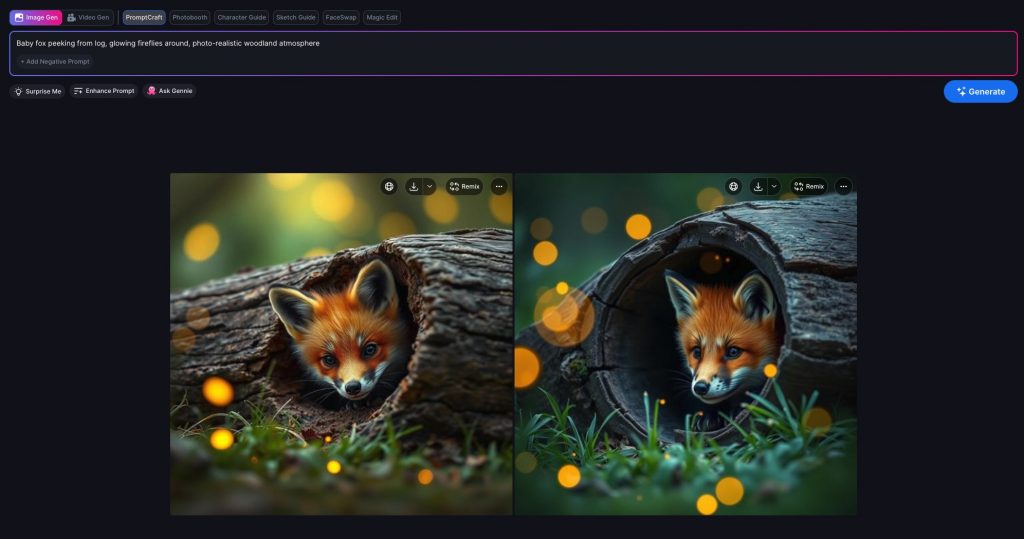
Our most realistic model, 3.2 [ultra] is now available to all Gencraft users.
We’re thrilled to share some major updates to Gencraft that will elevate your creative experience. From our most advanced photorealistic model to enhanced editing tools and improved navigation, there’s something for everyone. Let’s dive into the details of Realism 3.2 [ultra] and our other app improvements!
Experience Unmatched Realism with 3.2 [Ultra]
We’re excited to announce the launch of Realism 3.2 [Ultra], our most sophisticatedly trained model yet, now available to all Gencraft users for free!
This cutting-edge model produces incredibly lifelike images, comparable to photos taken with your smartphone. Whether you’re crafting for personal projects or professional endeavors, Realism 3.2 [Ultra] delivers the unmatched feeling and vibrant colors needed to bring your vision to life.
With this model, you can explore photorealistic portraits, stunning landscapes, or authentic product images.
Enhanced Editing with Magic Edit 2.0 for Pro Users
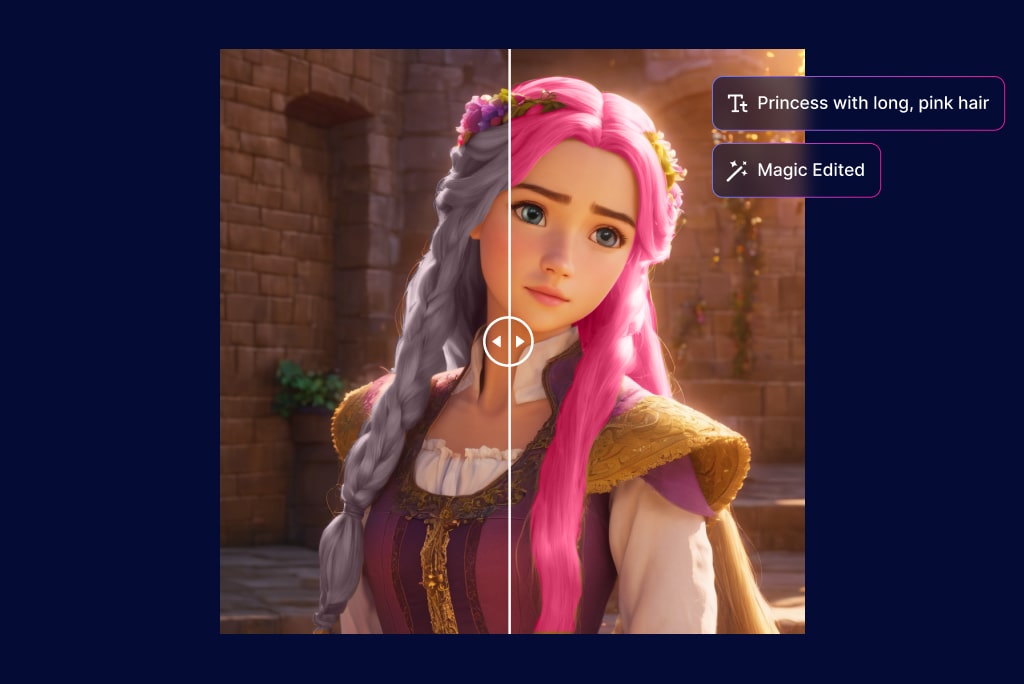
We’re introducing Magic Edit 2.0, an upgraded tool designed to provide greater accuracy and control when adding or replacing objects in your creations or photos.
Whether you’re refining an existing piece or enhancing a new concept, Magic Edit 2.0 enables seamless edits that blend naturally into your images. Pro users can start utilizing this powerful feature today.
📘 Want to master Magic Edit 2.0? Check out our step-by-step tutorial for tips and tricks to get the most out of this tool.
Navigate Your Creations with Zoom Out
As your collection of creations grows, organizing them becomes essential. We’re introducing a zoom-out feature that allows you to:
Easily scroll through hundreds of creations.
See your images organized by date created.
This feature helps you revisit and manage your past work easily. Tap on the “grid” icon, or pinch the My Creations (on Mobile) to zoom out!
Enhanced Model Search
With an expanding array of models, finding the right one is crucial. Our Enhanced Model Search allows you to:
Search directly from the Model Gallery
Explore both Gencraft and Community models shared by other creators, in one place.
This ensures you have the perfect tool for your next project. Stay tuned for more models coming soon!
Clarifying our Pro Plan Transparency
We’ve made an important update to clarify how our Pro Plan works. While we previously offered “unlimited prompts,” there were rarely protective guards employed to prevent misuse and spamming. Pro users are always welcome to generate up to 1,500 prompts per day—an incredibly high limit that most users will never reach.
This change is about being transparent with our community while continuing to provide incredible value. We’re working hard to make Gencraft’s Pro offering even more affordable while adding new features to enhance your creative experience.
As always, we’re grateful for your trust and feedback. Stay tuned for exciting updates for our Pro users soon!
Your creativity fuels our passion. We’re grateful to our incredible community of creators for inspiring us with your amazing work. We can’t wait to see how you utilize Realism 3.2 [Ultra], Magic Edit 2.0, and all the new features in this release.
We’re thrilled to formally introduce Gencraft — a place where imagination takes the lead, and everyone can embark on their own creative journey.
Gencraft4 minutes read
Other
Our Mission: Amplify your creativity to its fullest potential
Our mission is to empower everyone to become their most creative selves. We recognize that more and more of us spend time online, with creativity transforming in exciting ways.
We are building a platform where prompts create artistic visions. Prompts capture a moment of imagination as a set of instructions for our AI models to follow. We’ve seen these prompts celebrated in remarkable ways, and creators rewarded without the pressures typical of other social platforms.
We are excited to help you discover the thrill of shaping your unique voice through prompts, because everyone deserves the opportunity to explore and elevate their creativity. Even the most creative people can reach new heights with AI, as they unlock new ways to share their unique creations and stories.
As generative AI continues to evolve, it opens up exciting opportunities for new and experienced creatives to amplify their creativity. Creators will continue to innovate on their prompts, and they will find unique ways to spark inspiration and virality.
Gencraft removes barriers to artistic creativity
Let’s face it – diving into the world of AI-generated art can feel intimidating, inauthentic, or even frivolous for many users.
Whether it’s knowledge barriers, difficulty finding your audience, or simply not having enough time to explore the creative possibilities of AI, many aspiring creators never get the chance to discover their fullest potential.
Gencraft aims to solve all of these problems. We’re continuously innovating ways to simplify the process of prompting AI, and help creators connect with newer audiences. New eras of content creation foster new artistic skill sets and interests—so as we work hard to ensure we remain on the cutting-edge, more people will learn how to voice their imagination.
Gencraft AI benefits artists of all skill levels. Our platform offers both basic and advanced controls for users to begin and further refine their unique brand and voice.
Gencraft gives every creator the credit they deserve
In a world where AI-generated art becomes more and more inspiring, we need to make sure that original creators and prompts are recognized appropriately.
When prompts are easily replicated, their value is diluted, and this leaves the original creators unrewarded.
At Gencraft, we cherish creative AI prompts and stories. Prompting is an elaborate and distinguishable skill that creators should feel encouraged to express. Everyone’s imagination and ideas are unique, and we want every creator to find their voice without copying others. We are developing proper controls to reward creators for their hard work and disincentivize users from copying.
Gencraft enables engagement with diverse audiences
Gencraft enables creators to tap into a wide range of communities and niches, tailoring their content to explore previously unimagined artworks. As more users rely on AI art to express themselves, viewers are exposed to new artistic perspectives that weren’t possible on traditional social sharing platforms. Reaching diverse audiences provides higher potential for creative collaboration, and Gencraft users have found sensational success remixing and blending each other’s work.
We’ve made prompts and models highly flexible, making it even easier to collaborate and amplify published artwork on our platform.
How far we’ve come
Gencraft was born from a simple, yet powerful idea: everyone should be able find their creative voice and feel heard. Since our launch in 2023, we’ve grown to millions of active users worldwide, generating a ton of unique creations. But we’re just getting started.
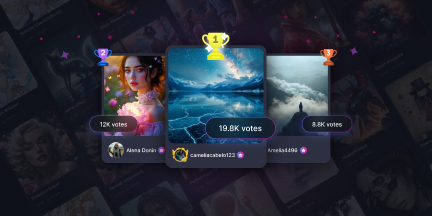
Our Feed of published creations grows daily, with more creators feeling connected to their audience and finding inspiration from others.
Our Feed of published creations grows daily, with more creators feeling connected to their audience and finding inspiration from others. Check out how our creators are expressing themselves:
Who we are
We’re a passionate team of artists, engineers, and dreamers united by a shared love of creativity. Join us and the rest of our community on Discord! (https://discord.com/invite/gencraft)
We’re always excited to listen to your creative stories and feedback!
Our core features
Gencraft provides access to high-quality, cutting-edge tools that users use to create professional-grade art.
Everyone receives 5 free daily credits, with each credit generating multiple images. These images can be published onto our social Explore feed, where other creators can like and comment. Anyone can even experiment with different models or blend them together for the perfect touch!
While our free models are perfect for starting the creative journey, we do offer premium features on our subscription, Gencraft Pro:
Uploading images
Editing your generated images
Training your own AI models
Lifetime image storage
And much, much more!
Unlock our advanced features to take your creative skills to the next level!
An audience and community for everyone
“I’ve only been using Gencraft for a couple weeks now and it’s my first venture into using AI in an artistic setting. Absolutely thrilled with the results achieved so far. Loving it so much it’s becoming addictive!“-@Wizzer62
“Genuine virtual artworks. I’ve seen beautiful pictures created with Gencraft that explore and inspire our inner imagination.“-@AVergh
“When I started working with AI generated images, I was first intimidated by the colors and depth of the images. But soon a whole new world opened up to me when I became the visionary, and the AI tool my collaborator. It is a powerful way to express yourself.“-@funiigyrl
Our users are always amazed at what they are able to accomplish with their imagination. We’d love for you to join the experience and share your creativity! Your next masterpiece is just a prompt away. Sign up for free!













![Image showcasing Gencraft's latest updates: Realism 3.2 [Ultra], Magic Edit 2.0, and new features for enhanced creativity and navigation.](https://staticblog.gencraft.com/uploads/2024/11/nov2024update-thumbnail-1.jpg)


