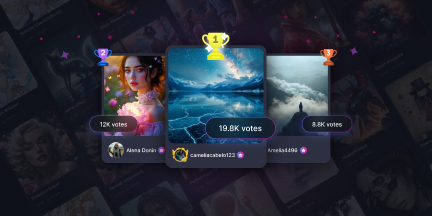
The Shot, our second contest, is now live and accepting submissions for the next 6 days! Think like a director and submit a frame that tells a story! Head over to the contest page to submit your creation for the chance to earn contest-specific rewards.
Gencraft2 minutes read
Other
The Shot, our second contest, is now live and accepting submissions for the next six days! Head over to the contest page to submit your creation and have a change at earning contest-specific rewards!
The Shot:
Think like a director. Create a single frame that looks like it was lifted straight from a movie scene. Through style, tension, subject, and action, your creation should tell a story. Get creative and explore different genres, styles, and themes!
Our second contest, The Shot, will begin accepting submissions on Friday, May 15 @ 12AM UTC.The phases will occur during the following times (UTC):
Submission Phase: Friday, May 15, 12AM – Thursday, May 21, 12AM
Voting Phase: Saturday, May 23, 12AM – Tuesday, May 26, 12AM
Results Announced: Thursday, May 28, 12AM
The theme for this contest is The Shot. There are no model, style, prompt, or feature restrictions.
We’re excited to see what everyone creates!
What are Contests?
Contests are community competitions in which everyone submits creations that meet the contest criteria before voting on others’ creations to ultimately crown the winners. Contests will run regularly and feature a unique theme or restriction.
Contest Rewards
Earn XP for participating in the contest, and earn special cosmetics for placing in the top 25!
Earn XP for submitting creations, participating in voting, and hitting daily quota limits. Also earn XP for top placements (the higher the placement, the more the XP).
Earn contest badges for placing in the top 25.
Earn contest crowns, a new cosmetic that features on your profile, for winning 1st place or winning the Editor’s Choice award.
To learn more about contests and potential rewards, check out the previous blog post about contests.
Save and instantly reload your favorite generation settings with Presets - no more reconfiguring from scratch! Also, level up your creations with all new prompt prefixes and suffixes! Presets are now available for Pro users on the browser app - coming soon to iOS and Android!
Gencraft4 minutes read
Feature
Generation Presets are now available for Pro users! Presets let you save and load your favorite generation settings, so you can spend less time reconfiguring settings and more time creating.
We’re also introducing new, preset-only fields to help take your prompt-crafting to the next level: prompt prefixes and suffixes! Prefixes and suffixes allow you to save text to be automatically added to the start and end of your prompts, respectively. Prefixes and suffixes are available for both positive and negative prompts!
This blog post will dive into Presets – what they are, how they work, and how best to use them!
What are Presets?
Generation Presets are a new feature that enable Pro users to save and load their generation settings. Presets were created to streamline the creation process for creators who have different combinations of generation settings they like to switch between.
Presets encapsulate the following generation settings: Model, Style, Aspect Ratio, Seed, Positive Prompt Prefix, Positive Prompt Suffix, Negative Prompt Prefix, and Negative Prompt Suffix.
Presets are feature-specific. For example, presets created for PromptCraft are not applicable to PhotoBooth, and vice cersa. Pro users can save up to 10 different presets across all features.
What are the Prefix and Suffix Fields?
The new prefix and suffix fields are ideal for users who find themselves typing the same set of words at the start and end of every prompt. A prefix is text that gets automatically added to the beginning of your prompt. A suffix is text added to the end. Together, they wrap your prompt like a template:
[prefix] prompt [suffix]
Prefixes and suffixes can be saved for both positive and negative prompts (for models that support negative prompts).
Example:
I create a preset with the following prefix/ suffix fields:
Positive prompt prefix: “Cinematic photograph, shot on 35mm film,”
Positive prompt suffix: “, natural lighting, high detail”
Then, the preset is applied on the following positive prompt: “a weathered fisherman on a dock at golden hour”.
The final prompt used for generation becomes the following: “Cinematic photograph, shot on 35mm film, a weathered fisherman on a dock at golden hour, natural lighting, high detail”
The same prefix and suffix are applied to future prompts while the preset remains active.
How do Presets Work?
From the Generate Screen:
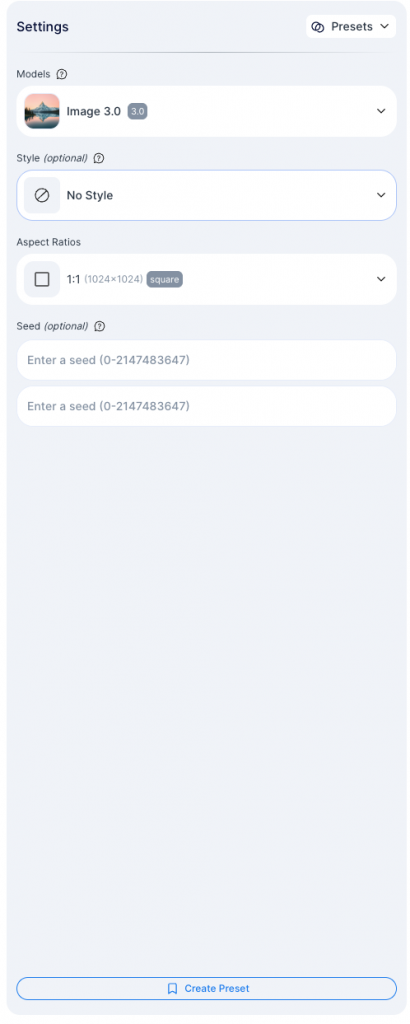
Presets are accessible through the Generate settings panel:
The ‘Create Preset’ button on the bottom of the settings panel will start the process for creating a new preset from the current generation settings.
The Presets dropdown in the top right will open the Preset selection panel, through which presets can be applied or edited.
From the Results Screen:
After generating with a preset, the preset will remain applied on the results screen for subsequent generations, unless another generation is applied or generation settings are reset to default. Accessing previous results generated with a preset will also ensure that generating additional iterations have the same prefix / suffix fields applied, even if the applied preset at the time has since been changed.
In all these cases, the preset name will be cleared from the dropdown in the top right, but the settings will persist.
Example:
I create a preset called “Natural Cinema” with the following prefix/ suffix fields:
Positive prompt prefix: “Cinematic photograph, shot on 35mm film,”
Positive prompt suffix: “, natural lighting, high detail”
I click generate, and the preset is applied on the following prompt: “a weathered fisherman on a dock at golden hour”.
On the results screen’s generation settings panel, “Natural Cinema” is no longer explicitly shown in the top right, but the prefix / suffix are still active and are applied to future generations.
Later, if I access this creation from My Library, the same prefix and suffix are applied to the generations created from the result screen of this creation.
Using Presets
Here are some tips on how best to use presets to improve your prompts:
Use presets to reflect your favorite aesthetics: presets are able to encapsulate entire aesthetics or vibes, including different composition types and styles.
Coordinate across your preset fields: each preset field can have a major impact on the generation result. Complimentary settings produce cohesive results, while conflicting settings create unpredictability.
Keep it simple and focused: overstuffing a single prefix with too many ideas reduces the chance that the result will match what you’re looking for. More doesn’t always mean better.
Experiment and iterate: Presets are easy to create and easy to edit, so start small! Start with a model and a prefix, and then add additional settings to bring your results closer to your desired vision.
Prefixes: Use prefixes to influence the style and medium of your creations.
Suffixes: Use suffixes to influence the quality and technical finishing of your creations.
We’re excited to launch Presets as a powerful new generation tool, and even more excited to see what you all create! Give presets a try and let us know what you think!
Cybernetic Wilds, our inaugural contest, is now live and accepting submissions! Head over to the contest page to submit your creation and have a change at earning contest-specific rewards!
Gencraft1 minute read
Feature
Cybernetic Wilds, our inaugural contest, is now live and accepting submissions! Flex your creativity, prompt-writing skills, and custom models to win special rewards and XP in new themed contests! Head over to the contest page to submit your creation and have a change at earning contest-specific rewards!
Cybernetic Wilds:
Share your interpretation of a natural environment influenced by technology. Tell a story of mutual symbiosis creating a flourishing landscape, or a tale of conflict and decay. Be creative and explore different styles, elements, or interpretations!
To learn more about contests and potential rewards, check out the previous blog post.
Flex your creativity, prompt-writing skills, and custom models to win special rewards and XP in new themed contests! The very first contest, Cybernetic Wilds, will start on Thursday, March 26 @ 11 PM UTC! Learn more about contests on our blog!
Gencraft3 minutes read
Feature
Introducing Contests
Flex your creativity, prompt-writing skills, and custom models to win special rewards and XP in new themed contests!
Contests are community competitions in which everyone can submit creations that meet the contest criteria and vote on others’ creations to ultimately crown the winners. Contests will run regularly and feature a unique theme or restriction.
The inaugural contest will start on Thursday, March 26 @ 11 PM UTC, and submissions will be open until Monday, March 30 @ 11 PM UTC. Keep reading to learn about how contests work as well as potential rewards!
How do Contests Work?
All users are able to participate in contests. Contests consist of three main phases: submission, voting, and results.
Contests start with the submission phase, in which users are able to submit eligible creations to the contest. Submissions must adhere to the contest guidelines (see full details at the bottom of the blog post) and fit the contest theme. Free users can submit one creation per contest. Pro and Starter users can submit two creations per contest. Take the time to experiment with different prompts, models, styles, and features – change or delete submitted creations anytime until the submission phase ends.
Once submissions are locked, voting begins. During this time, users will receive a certain amount of daily votes and participate in batch-style voting on other users’ submissions. Voting takes place over multiple days, and the vote quota refreshes daily.
The voting period is followed by a waiting period during which the team will review the winning submissions and assign the Editor’s Choice award to one noteworthy submission. Then, results are announced for everyone to see – users will be able to see the winning submissions, as well as the placement results for their submissions.
Past contest results will be available to view as well from the second contest onwards.
Contest Rewards
Earn XP for participating in the contest, and earn special cosmetic rewards for placing in the top 25!
Earn XP for submitting creations, participating in voting, and hitting daily quota limits. Also earn XP for top placements (the higher the placement, the more the XP).
Earn contest badges for placing in the top 25.
Earn contest crowns, a new cosmetic that features on your profile, for placing in the top 3 or winning the Editor’s Choice award.
First Contest
The first contest will take start on Thursday, March 26 @ 11 PM UTC and officially end on Friday, April 3 @ 11 PM UTC. The phases will occur during the following times:
Submission Phase: 3/26 Thursday, 11 PM UTC – 3/30 Monday, 11 PM UTC
Voting Phase: 3/31 Tuesday, 1 AM UTC – 4/2 Thursday, 1 AM UTC
Results Announced: 4/2 Thursday, 11 PM UTC
The theme for the first contest is Cybernetic Wilds. Magic Edit and FaceSwap will not be allowed for this contest. Besides that, there are no model, style, prompt, or feature restrictions!
We’re excited to see what everyone creates!
Additional Info & Guidelines:
Submissions:
Free users can submit one creation per contest. Pro and Starter users can submit two creations per contest.
Only creations generated on Gencraft are eligible for submission. Attempts to bypass this (e.g. using a creation generated from an external source) will be disqualified.
At least 1 valid submission is required to participate in the contest.
Submissions do not have to be published.
Submissions must follow contest-specific themes.
Submissions must adhere to Gencraft’s Content Policy, follow the weekly theme, and use any required features (e.g., FaceSwap, PhotoBooth).
Voting:
Your submission(s) will be excluded from the voting batches.
Once your votes are cast, submit your vote. You can not edit your votes after submission.
Creators are kept anonymous to ensure fair voting.
We’re excited to announce the launch of our redesigned generate experience on our mobile apps! This redesign also has the goal of making generating content smoother and more intuitive, while also making it easier to view and remix results. Check out the full blog post for all the details. Explore the redesigned app and let us know what you think via Discord or the in-app feedback form!
Gencraft2 minutes read
Design Update
Hi Everyone,
We’ve just launched our mobile redesign! A couple of months ago, we went live with our web redesign – you can read about it in our last blog post. This time around we’ll be diving into what’s changed with our mobile app, as well as our motivations.
Similar to the web redesign, this redesign primarily targets the end-to-end generate experience, from writing prompts and selecting generation settings to viewing your creations. We wanted to ensure you all were receiving a better, more intuitive generation experience for our users while maintaining all existing features and functionality.
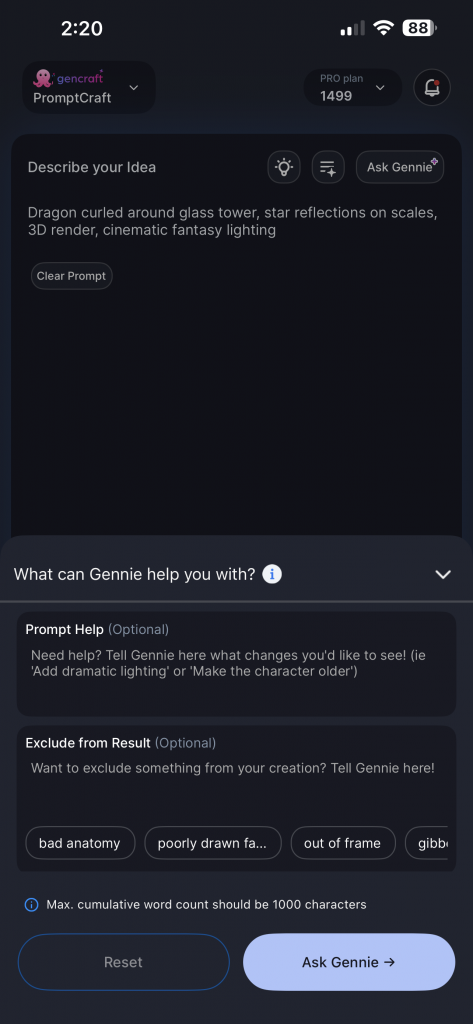
The new generate screen!Easily customize your generation settingsAsk Gennie for help in crafting your promptsThe redesigned generate experience
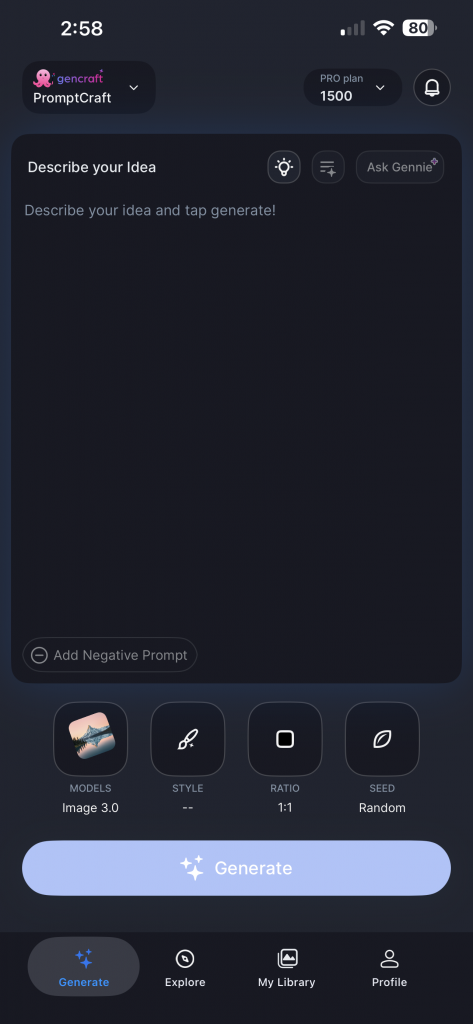
The new generate screen presents a simplified UI that emphasizes the prompt input, which is the most important element for creation. Optional inputs, like reference images, are hidden unless required for the selected feature. We want users to be able to generate quickly without extraneous UI elements.
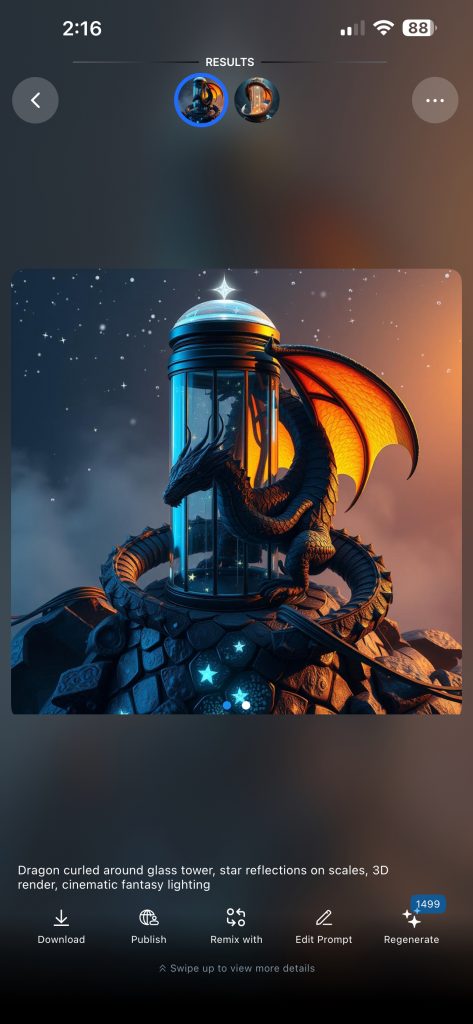
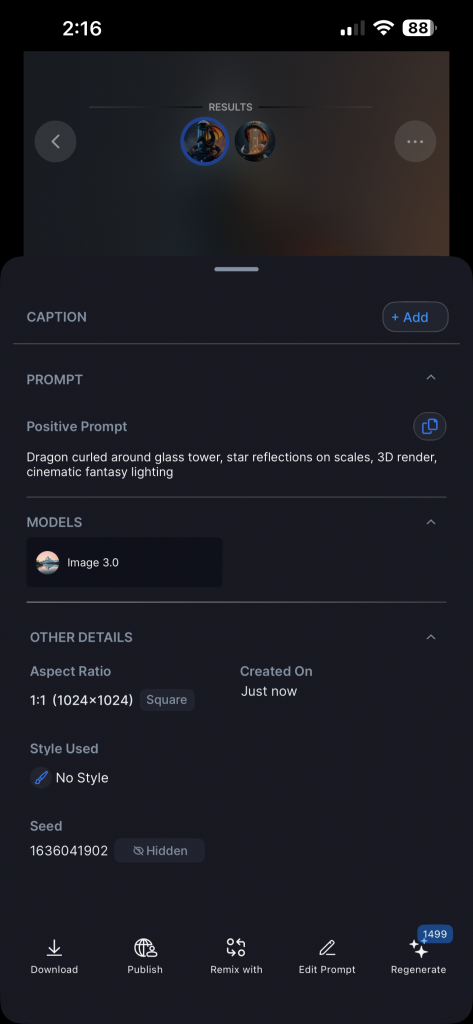
The new result screenSwipe up to view result detailsThe revamped result screen experience
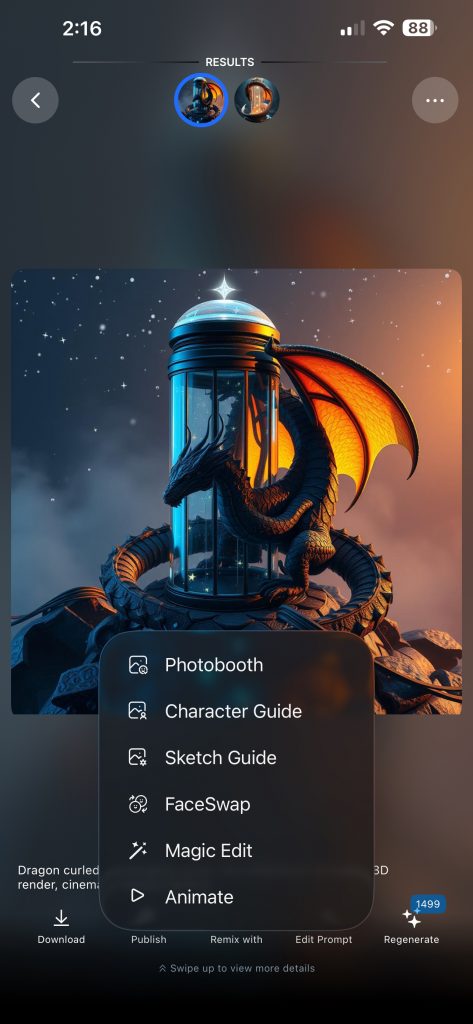
The new creation results screen brings more focus to the actual creation, which is now larger and more prominent. Swipe left and right to navigate between both creations, and swipe up to view the full details for the creations. Key actions like remixing, publishing and downloading are still one tap away, but are now consistently organized in the UI.
Overall, the new redesign will help Gencraft feel more modern and intuitive to new and old users alike. Please give the redesign a try and let us know any feedback!
We’re excited to officially announce the launch of our redesigned generate experience for WEB! This redesign was built from the ground up to make generating content smoother and more intuitive, while also making it easier to view and remix results. Check out the full blog post for all the details. Explore the redesigned app and let us know what you think via Discord or the in-app feedback form. And be on the lookout for some exciting announcements coming up!
Gencraft2 minutes read
Design Update
We’re bringing the blog back! In this post, we’ll dive deeper into what’s new with the latest updates on Web, share some insight into the motivation behind the changes, and cover any other relevant updates.
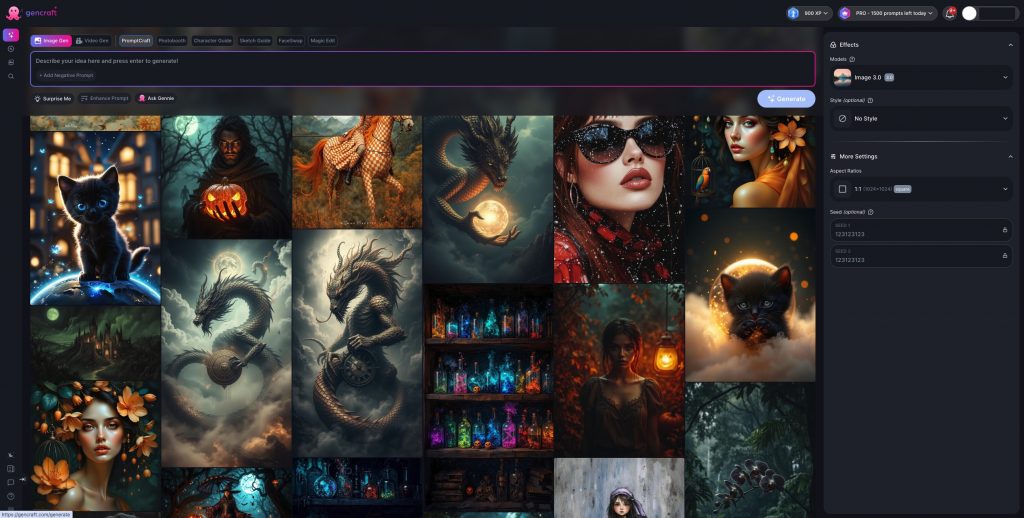
First, the largest and most visually noticeable change with this update – the redesigned generation flow. This was a large undertaking by the development team that began with redesigning the generation flow from the ground up. We wanted to address a few key areas with the redesign: consistent UX, making it easier to iterate on an idea via re-generating, and showing community creations directly on the generate screen.
The redesigned generate screen
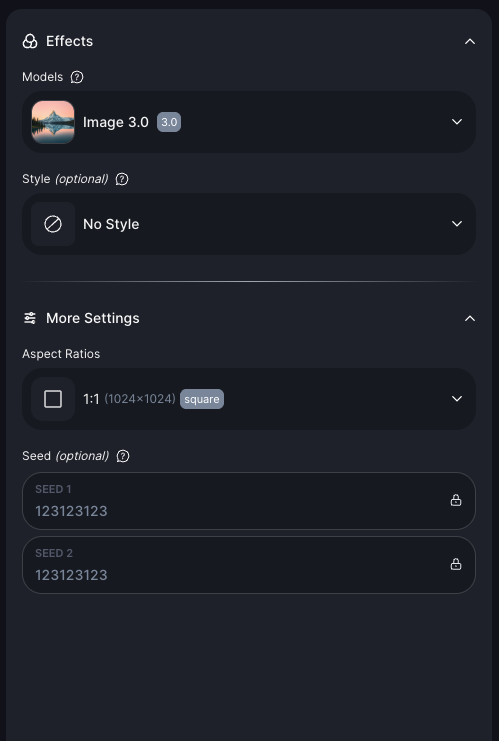
The new generation screen has all the various generation settings and configurations (model, style, aspect ratio, etc.) in one place: the right panel. Model and style selection have consistent UX as well. Features like Photobooth, Magic Edit, and Animate are now much easier to access and switch between.
Right-side panel containing all the generation settings
Another notable change is the introduction of the explore feed on the Generate page. Users can browse others’ creations directly on the Generate page and switch between filters like Most Liked, Trending, Newest, etc. With this, users can more easily draw inspiration from others’ work without needing to switch to the explore page, as well as find interesting creations to remix. The Explore page is unchanged, so feel free to browse there as well!
Browse community creations while generating!
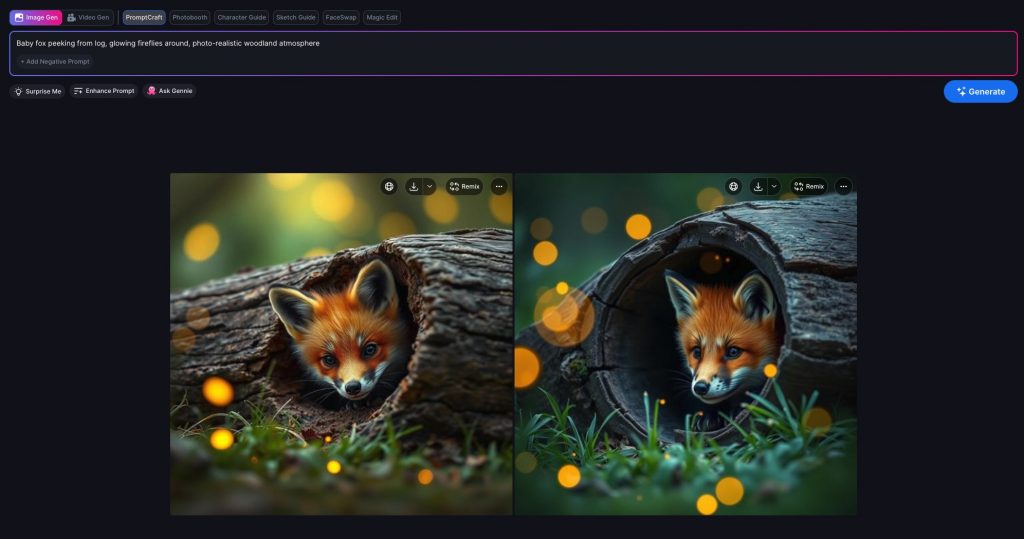
The generation results screen has also been overhauled – now, both creations are directly shown side-by-side. Users can view and compare the two creations without hopping back and forth between results. Additionally, users can continue to generate straight from the results screen – feature selection, prompt input, and generation settings are available even while viewing results. This makes it easier than ever to iteratively improve a prompt or output, or just to regenerate with a new seed.
See image results side-by-side on the new results screen.
In addition to the redesign, we’ve also added an in-app announcement system to allow for broader communication with users, as well as an in-app feedback form to ensure users are able to share their thoughts. We appreciate all user feedback, so please let us know how you’re feeling about the redesign or your experience with Gencraft in general!
The new in-app feedback form!
This update also includes a few smaller UI changes and bug fixes that should help the app run more smoothly.
Overall, we’re excited to see what everyone thinks about the design changes. Right now, only the web design has been refreshed, but updates to the mobile apps are coming as well! We’re also working behind the scenes on a couple larger updates, so be on the lookout for any upcoming announcements. Thanks for reading, and keep on creating!
We’re excited to announce a major upgrade to our XP system, adding milestone-based rewards for all Gencraft users! As you accumulate XP by creating images and earn rewards you can redeem to celebrate milestones and further your creative journey.
At Gencraft, our mission is to empower everyone to find a home for their imagination, helping them find their unique voice and connect with a like-minded community. We hope the XP system grows into a tool that inspires users in remarkable ways, unlocking new opportunities for creativity and collaboration.
Let’s take a closer look at how our updated XP system works and the creative features we’re excited about.
Maximize Your Creativity: How the XP System Works 👇
At Gencraft, we place tremendous value on our users and their journeys. That’s why we aim to create a transparent and fair reward system by explaining in detail how it works.
For Pro users, the XP system includes additional opportunities to earn rewards, which means even more ways to celebrate your progress. Meanwhile, new users and those with less XP don’t need to worry—they can catch up by using tips and completing quests specifically designed to help maximize XP gains.
Check Out the XP Portal
To make tracking your progress easy, we’ve created the XP Portal. If you haven’t already, check out the XP Portal on Gencraft!
Keep track of your reward progress within your Gencraft account’s XP Portal, located in the top header. In the portal, you can learn about XP, view your XP gains so far, and the XP required to unlock your next reward. This makes it easier than ever to stay on top of your milestones and plan your next creative steps.
From this Portal, you can also navigate to the Rewards Store and view the rewards you’ve earned.
See Your Rewards at the Store
Our Rewards Store is the one-stop place to manage all your earned rewards. Here, you’ll find stauses for each reward, categorized as:
Available: Ready to claim!
Claimed: Claimed but not yet used.
Expired: Claimed but not used in time.
Used: Claimed and fully redeemed.
Additionally, rewards currently in use are labeled “In Use” on their Reward Card.
When you’re eligible to claim a new reward, you’ll be notified through the XP Portal. Once you claim it, you’ll automatically enter the Store to reveal your mystery prize!
Show Off Your Style: Unlock Badges!
As you continue publishing content and interacting with the community, you’ll have the opportunity to celebrate your achievements with stylish Badges! Once you reach a certain XP threshold, you’ll become eligible to redeem badges that display on your profile
To claim your badge, simply visit the Rewards Store. Once claimed, badges can be used immediately to showcase your creative mastery.
Your badge and its associated labels will be displayed prominently on your profile, feed, comments, and more until it expires. Moreover, clicking a user’s badge opens a pop-up explaining its significance!
We’re very excited to bring more badges to the Rewards Store as creators continue to express themselves in unique ways.
Celebrating Our Creators: Inspiration in Action
Our community is already lighting up with users proudly showcasing their badges—and we couldn’t be more excited! For example, creators like SorayaK and VisionaryArt have used their badges to elevate creative presence in our Gencraft community, standing out with their stunning work and achievements.
If you’re curious, take a look at the Social Feed to see badges in action! Whether you’re a veteran user at the top of the leaderboards or a new user starting your creative journey, badges make your profile even more impactful.
As we onboard more creators and release more rewards, we’ll see each badge telling a story, celebrating the dedication and creativity behind earning it.
So why wait? Join the movement! Claim your badges, display them proudly, and share your unique journey with the Gencraft community. Your achievements could inspire others to reach their own creative milestones.
Exciting Future Rewards: Boosted Posts 🎉
Get ready to take your creations to the next level with Boosted Posts, an upcoming Reward on Gencraft! With this feature, you’ll be able to redeem XP to boost the visibility of one of your creations on the Social Feed. Your work will be in front of more eyes and unlock new opportunities for connection.
Boosting your creation will make it easier than ever to amplify your voice and stand out in the Gencraft community.
Stay tuned for the launch of Boosted Creations in a future release—and start earning XP now to boost your best creations and inspire the world!
Thanks to Our Gencraft Community
At Gencraft, we’re passionate about the creators behind the creations. Our new XP system honors all of the hard work our creators have done and the creativity they’ve brought to the platform.
We can’t wait to see how you use XP rewards to accelerate your journey. Happy Gencrafting!
Discover Gencraft's November 2024 features: Realism 3.2 [Ultra], Magic Edit 2.0, and more enhancements to elevate your creative journey.
Gencraft3 minutes read
Other
Our most realistic model, 3.2 [ultra] is now available to all Gencraft users.
We’re thrilled to share some major updates to Gencraft that will elevate your creative experience. From our most advanced photorealistic model to enhanced editing tools and improved navigation, there’s something for everyone. Let’s dive into the details of Realism 3.2 [ultra] and our other app improvements!
Experience Unmatched Realism with 3.2 [Ultra]
We’re excited to announce the launch of Realism 3.2 [Ultra], our most sophisticatedly trained model yet, now available to all Gencraft users for free!
This cutting-edge model produces incredibly lifelike images, comparable to photos taken with your smartphone. Whether you’re crafting for personal projects or professional endeavors, Realism 3.2 [Ultra] delivers the unmatched feeling and vibrant colors needed to bring your vision to life.
With this model, you can explore photorealistic portraits, stunning landscapes, or authentic product images.
Enhanced Editing with Magic Edit 2.0 for Pro Users
We’re introducing Magic Edit 2.0, an upgraded tool designed to provide greater accuracy and control when adding or replacing objects in your creations or photos.
Whether you’re refining an existing piece or enhancing a new concept, Magic Edit 2.0 enables seamless edits that blend naturally into your images. Pro users can start utilizing this powerful feature today.
📘 Want to master Magic Edit 2.0? Check out our step-by-step tutorial for tips and tricks to get the most out of this tool.
Navigate Your Creations with Zoom Out
As your collection of creations grows, organizing them becomes essential. We’re introducing a zoom-out feature that allows you to:
Easily scroll through hundreds of creations.
See your images organized by date created.
This feature helps you revisit and manage your past work easily. Tap on the “grid” icon, or pinch the My Creations (on Mobile) to zoom out!
Enhanced Model Search
With an expanding array of models, finding the right one is crucial. Our Enhanced Model Search allows you to:
Search directly from the Model Gallery
Explore both Gencraft and Community models shared by other creators, in one place.
This ensures you have the perfect tool for your next project. Stay tuned for more models coming soon!
Clarifying our Pro Plan Transparency
We’ve made an important update to clarify how our Pro Plan works. While we previously offered “unlimited prompts,” there were rarely protective guards employed to prevent misuse and spamming. Pro users are always welcome to generate up to 1,500 prompts per day—an incredibly high limit that most users will never reach.
This change is about being transparent with our community while continuing to provide incredible value. We’re working hard to make Gencraft’s Pro offering even more affordable while adding new features to enhance your creative experience.
As always, we’re grateful for your trust and feedback. Stay tuned for exciting updates for our Pro users soon!
Your creativity fuels our passion. We’re grateful to our incredible community of creators for inspiring us with your amazing work. We can’t wait to see how you utilize Realism 3.2 [Ultra], Magic Edit 2.0, and all the new features in this release.










![Image showcasing Gencraft's latest updates: Realism 3.2 [Ultra], Magic Edit 2.0, and new features for enhanced creativity and navigation.](https://staticblog.gencraft.com/uploads/2024/11/nov2024update-thumbnail-1.jpg)


